
How to Cancel a DigitalOcean Account and Stop Billing
How to Cancel a DigitalOcean Account and Stop Billing
Deactivating a DigitalOcean account stops future resource creation and billing, but you should first back up your data, review team ownership and destroy resources you no longer need. DigitalOcean can still charge the team's payment method for its final balance.
This guide follows DigitalOcean's account documentation, last checked on July 17, 2026.
Before you cancel
| Check | Why it matters |
|---|---|
| Back up important data | Destroying a Droplet, volume or database can permanently delete data |
| Download invoices | You may need them for accounting or a billing dispute |
| Review every team | Resources and billing belong to teams, not only to your personal login |
| Resolve team ownership | A sole owner may need to transfer ownership or delete the team |
| Check the final balance | Deactivation does not erase charges already incurred |
Turning off a Droplet is not enough. A powered-off Droplet still reserves resources and remains billable until you destroy it.
1. Back up anything you need
Export databases, copy files and download any snapshots or backups you want to keep outside DigitalOcean. Also save invoices from the Billing page.
Do not create a snapshot only as a way to stop charges. Snapshots are billable resources too.
2. Delete billable resources
Open each team in the control panel and check for:
- Droplets and backups
- volumes and snapshots
- managed databases
- load balancers
- Kubernetes clusters
- container registry storage
- reserved IPs and other paid services
Destroy only the resources you no longer need. DigitalOcean may not allow you to delete a team while it still owns resources.
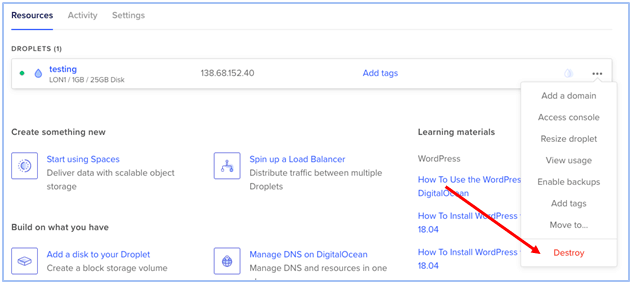
3. Resolve team memberships
DigitalOcean's deactivation rules depend on your role:
- If you are the only owner of a team that has other members, transfer ownership or delete the team.
- If another owner remains, deactivating your account removes you from that team.
- If you are the team's only member, DigitalOcean deletes the team during deactivation.
Check this carefully if a company or client still uses the team. Deactivating your login must not leave active infrastructure without an owner.
4. Deactivate the DigitalOcean account
- Sign in to the DigitalOcean control panel.
- Select your profile icon in the top-right corner.
- Choose My Account.
- Scroll to Deactivate account.
- Select Deactivate, then confirm Deactivate Account.

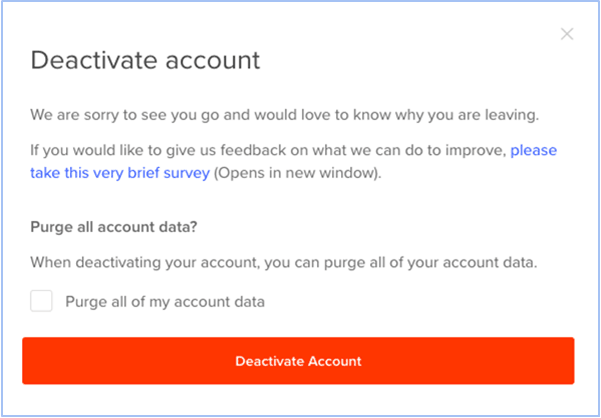
DigitalOcean says a deactivated account can be reactivated later with its account history, verification status and resource limits. Deactivation is therefore different from permanently purging account data.
5. Purge personal and billing data if needed
During deactivation, DigitalOcean may offer an option to permanently remove account data, including email and billing information. Purging prevents later reactivation. You would need to create and verify a new account to use DigitalOcean again.
Do not choose this option until you have downloaded invoices and confirmed that you no longer need account history.
For the current procedure, see DigitalOcean's official guide to deactivating accounts and purging data.
Can you remove a credit card without canceling?
DigitalOcean requires an eligible payment method for an active team. The Billing page may let you remove a backup method, but you generally cannot remove the method that is currently required for billing until you replace it or close the relevant account or team.
If the control panel does not show a remove option, do not rely on deleting the card at your bank to close the service. Destroy billable resources and complete DigitalOcean's deactivation process.
Does DigitalOcean give refunds?
Deactivation does not automatically refund valid usage charges. If you see duplicate charges, unexpected usage, unused promotional credit or a resource you could not delete because of a platform error, open a support ticket and include:
- the team and invoice involved
- the resource IDs
- the relevant dates and amounts
- screenshots or error messages
- the result you are requesting
DigitalOcean decides billing adjustments case by case. Avoid promising yourself or a client that a refund is guaranteed.
A DigitalOcean alternative
If you are leaving because you need more locations or shorter billing increments, LightNode offers hourly VPS plans in a wider range of regions. It is also self-managed, so you remain responsible for server security, backups and software administration.
Compare the location, bandwidth allowance, backup price and support scope before moving. A lower headline price does not always mean a lower total bill.
FAQ
Does deleting a Droplet cancel my DigitalOcean account?
No. Destroying a Droplet stops billing for that Droplet, but your account remains active. Other resources can still generate charges.
Does powering off a Droplet stop billing?
No. You must destroy the Droplet to release its allocated resources and stop its compute charge.
Can I reactivate a deactivated account?
Yes, unless you chose to purge the account data. Purged accounts cannot be reactivated.
Why can I not deactivate my account?
The usual causes are unresolved team ownership, remaining resources or an outstanding account requirement. The deactivation page should list the actions you need to take.
Will DigitalOcean charge me after cancellation?
Deactivation stops new billing, but DigitalOcean can charge the payment method for the final balance already incurred. Check the final invoice after closing the account.
How do I contact DigitalOcean about billing?
Use the DigitalOcean support portal while you can still access the account. Include specific invoice and resource details so the billing team can investigate.